Showing posts with label PyroCMS. Show all posts

Sunday, November 18, 2012

My First take on PyroCMS


What is PyroCMS ?

PyroCMS is a open source framework for content management system created with standard PHP/MVC framework CodeIgniter. It is light and simple to use and is for both the developers and the end users. Generally it is used for websites which contains large amount of content/articles. The content should be well presented to the user for displaying as per requirement . This is where pyrocms comes which can manage the display of those content as per requirement.


How PyroCMS can be customized to develop websites on it ?

PyroCMS provide the dashboard for administration section to be used for developing big content based websites easily.
As it provides various tools/modules for implementing the website design and functionality which are very necessary for the a perfect websites.

Modules such as:

Navigation: It is used for the navigate through out website links.
Blog: This is used for the articles to be posted like blogs, also they can be well surfed by the end users.
Comment: Users and guests can write comments for content published and share their views.
Pages: Add pages to the site with content that are mostly static or vary in time.There are many other modules that can used


Why PyroCMS is better than Wordpress, Drupal and other existing CMSes ?

All of the CMSes have not any fixed and standard framework for using it. Therefore it will be difficult for different developers to interact with various created sites. With pyro we are developing a cms with customized outlook and standard framwork which can be very developer friendly.

What can we do with PyroCMS ?

Being small and flexible, PyroCMS can be very usefull to small and to large content based sites.


What are PyroCMS Themes ? 

Themes are the outlook that are presented to users. It contains the design that can be navigated by the users. PyroCMS provides suitable method to develop the themes. PyroCMS contains main layout and the partials files that make up the single website theme.


How to build PyroCMS themes ?

In PyroCMS Theme are structured in different folders like css for stylesheets files, js for javascripts and views for overall structure of the website. In views folder the main design is kept inside layouts which is the central look . The designs are splitted within the folder called partials which contains the design units like header, footer, sidebar etc.  Also necessary information about the theme and the screenshot is also included for informations.


Lastly, using Pyrocms was very fun to use. It is more similar to CodeIgniter therefore people comfortable with codeIgniter may find it very easy to use. Also it is very useful for customizing our desired look and functionality. Also we should use it very calmly. Despite of few documentations and support i am sure user/develop would find it very handy. 
 

Tuesday, November 8, 2011

PyroCMS Themes, Widgets & Modules samples + tutorials


Themes :

https://github.com/semicolondevelopers/pyro_theme_artificial_casting
https://github.com/semicolondevelopers/pyro_theme_blue_spades
https://github.com/semicolondevelopers/pyro_theme_business_time
https://github.com/semicolondevelopers/pyro_theme_coffee
https://github.com/semicolondevelopers/pyro_theme_eco_design
https://github.com/semicolondevelopers/pyro_theme_night_club

PyroCMS v1.3.2 Theming Guide for beginners:
http://echo.semicolondev.com/2011/11/hot-to-create-pyrocms-v132-theme-step.html

PyroCMS Tag Cheat Sheet
http://techmix.net/blog/2011/10/23/pyrocms-tag-reference-cheat-sheet/

Widgets

https://github.com/semicolondevelopers/pyro_widget_category
https://github.com/semicolondevelopers/pyro_widget_login_box
https://github.com/semicolondevelopers/pyro_widget_selected_category_posts

PyroCMS v1.3.2 Widget creation guide for beginners
http://echo.semicolondev.com/2011/11/how-to-create-pyrocms-v132-widgets.html

Modules:

Hello World Module
https://github.com/semicolondevelopers/pyro_module_hello

Old 0.9.9.x Forum module upgraded to v1.3.2
https://github.com/semicolondevelopers/pyro_module_forums

PyroCMS v1.3.2 & v0.9.9.7 Module Creation guide for beginners:
http://bhu1st.blogspot.com/2010/09/hello-world-pyrocms-module.html

Monday, November 7, 2011

Hot to create PyroCMS v1.3.2 Theme/ Step by step PyroCMS Theming Guide


A quick guide for creating PyroCMS Theme from a normal HTML / CSS template

Get any HTML /CSS template & follow the steps below!!

We prefer:
http://www.freecsstemplates.org
http://www.oswd.org

1. Install PyroCMS.

2. Go to installation folder -> addons -> shared_addons -> themes

3. There are two pre built themes. Copy either “minimal” or “conjuction” folder & paste it .

4. Here, we’ll use folder “minimal” . You’ll now see a new folder named “Copy of minimal”.

5. Rename it with the new theme name as u like. I’ll name it “tutorial”

6. Open the folder .

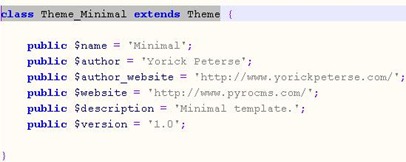
7. Open file “theme.php” in notepad++ or any other IDEs.

8. In the file

Replace “ class Theme_Minimal extends Theme “ with “class Theme_Tutorial extends Theme “

PTR : Old theme folder’s name must be replaced with the new folder name u gave to it. The first letter of name should begin with the capital letter.

clip_image001

Replace the text in between the single quotation mark as relevant.

Save & close the file.

9. Delete all the files in CSS folder & put the css file of ur new template in that folder.

10. Goto folder “views” -> then folder “layout”. There is a file “default.html” which is supposed to be like “index.html” of HTML/CSS template.

11. Open “default.html” in editor.

12. Also open the index.html file of downloaded template in editor.

13. Copy all the content of “index.html” in to the “default.html” after removing the initial content of “default.html” .

14. Replace CSS linking code in head section

<link rel="stylesheet" href="style.css" type="text/css" charset="utf-8" />

With

{pyro:theme:css file=”your_css_filename.css”}

15. If u hav javascript file in templates…create JS folder in “Tutorial” folder & paste inside it..

16. Linking Js file from head section

{pyro:theme:js file=”filename.js”}

In case u hav multiple files…use same code multiple times bt the order of js/css should occur as it is in template head section

17. Now..we break down the file “default.html” into multiple files.

18. All broken mini files are called partials and they should be kept in folder “partials”.

19. Let’s check the breaking process..

20. Create a new file named “metadata.html” & then cut the code inside <head> tag & paste it to “metadata.html”.save the file in folder “partials”.

21. Create a new file named “nav.html” & then cut the code inside <head> tag & paste it to “metadata.html”.save the file in folder “partials”.

22. You can cut contents in side the <div> tags as well.

Suppose: default.html has following code

<div class=”nav”>
<ul>
<li>home</li>
<li>contact</li>
</ul>
</div>

Cut the contents inside <div></div> tag and paste it to new file & name it “nav.html” & save it to “partials” folder

23. Similarly break other codes from default.html file & save to partials.

24. Now we learn to link the files in folder”partials” so that the code we broke is included in default.html.

In head section

<head>

{pyro:theme:partial name=”metadata”}

</head>

In <div> tag

<div class=”nav”>

{pyro:theme:partial name=”nav”}

<div/>

25.Now we learn to use images in the theme we working for.

26. copy the folder “images” from the downloaded template & paste it to the theme folder.

27.check CSS file & find the images it has been using..then cut all images from folder “images” except those being used by css file & paste it to new folder named “img”.

28.replace the code in other files.
initial code :- <img src=”button.png” alt=”submit”/>

New code :- {pyro:theme:image file=”button.png”}

29. to get the navigation menu set by from the admin panel in certain div

<div class=”menu_bar”>

{pyro:navigation:links group=”header”}

</div>

30. to get the content set by admin (dynamic content) in any div
<body>

<div class=”main_content”>

{pyro:template:body}

</div>

There go you. Your PyroCMS Theme is now ready to be used.

For Code Visit our Github page:
https://github.com/organizations/semicolondevelopers

Tutorial by:
Prajwol Shrestha
Semicolon Developers

How to create PyroCMS v1.3.2 widgets ?


A quick guide for creating new widget in PyroCMS.

1. Go through these folders
CMS_installed_folder -> system -> cms -> widgets

2. All these folders are for separate widgets.copy anyone. We’ll use it as reference to create a new widget.

3. Paste that folder in
CMS_installed_folder -> addons -> shared_addons -> widgets

4. Here suppose I copied “navigation” widget folder & pasted.

5. There is folder name “views” & a file named “navigation.php”

6. Two more files inside “views” folder ..named “display.php” & “form.php”. “Display.php” is for frontend

7 “form.php” is for control panel.

7. Every widgets should hav the above mentioned folder & files bt with the name according to ur requirement.

8. Now we edit the files in the folder we pasted.

9. Suppose we are displaying categories via this widget.

10. Rename the folder to ”category”.

11. Rename file navigation.php to category.php.

12. Open category.php in text editor.

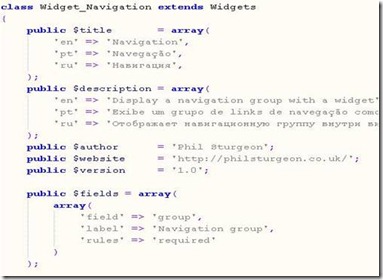
clip_image002

13. Rename Widget_navigation to Widget_Category. The replaced text should contain the name of ur file u r editing & name must begin wid the capital letter.

14. ‘en’ , ‘pt’ ,’ru’ etc are the languages..so u can delete them except “en” . en is the English language..

15. Replace text ‘en’ => ‘navigation’ with ur widget name. ‘en’ => ‘category’ in title array.

16. Replace text ‘en’ => ‘Display a navigation group with a widget’ with ‘en’ =>’description of ur widget’.

17. Change value of $author,$website & $version as u wish.

18. image The $fields is the array of fields that will be appearing in the form for control panel & passing the value while calling a function.

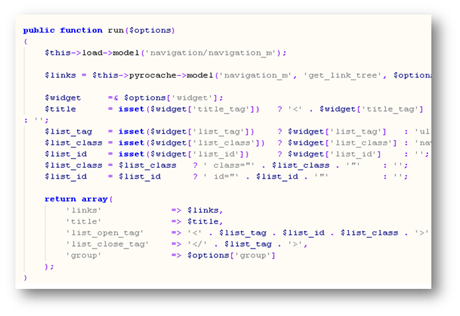
Here, run function is for running the query. If input has been taken from form in the control panel ,then the parameters should be passed to the function with variable “$options” else it will be just run(). We fetch an array in $options from the from in control panel.

19. U hav to load the model file which contains the database query u require. Or u can create your own model with reference of old model. If u dnt want to create new model..u have to add a function that can return the require the data from database in it.

20. That function called from run function and returns the array data to run function.

21. Run function returns it to display.php & this file renders the content to front end.

22. Grab the array in display.php & use it to display the require contents.

To install the widget :

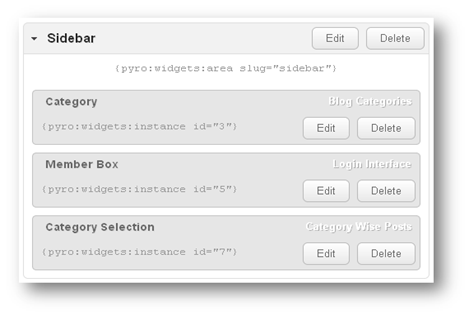
1. Goto admin panel.image

2. 

Content -> widgets -> drag & drop widgets from list to the available areas.

3. Copy the code {pyro:widgets:instance id=”3”} & paste it the front end html file where u wud like the widget’s content to be displayed.

For Code Visit our Github page:

https://github.com/organizations/semicolondevelopers

Tutorial by:
Prajwol Shrestha
Semicolon Developers


© 2013 Echo "Semicolon Developers"; Kathmandu. All rights resevered @ Semicolon Developers Network Pvt. Ltd.. Designed by Templateism

Back To Top